 USA AI Tools
How to Block AI Crawlers With robots.txt (and What It Cannot Stop)
 By Naumann Nasir · Last updated
Meta's revised Commercial Terms take effect on October 30, 2026. As Search Engine Journal reported, they include a clause that lets Meta crawl websites associated with businesses that use its products, which covers a Facebook Page as well as ad accounts. After pushback, Meta removed the word "train" from that clause and told reporters that site owners can still manage crawling with robots.txt. The terms themselves do not mention robots.txt.
So a lot of site owners are opening robots.txt this week, some for the first time. This guide shows how to write the AI-crawler part of the file, what each line does, and the limits you should know about before you rely on it. The base file comes from the free Robots.txt Generator on this site. I tested the rules below with two different robots.txt parsers, and they surfaced one problem worth knowing about.
What robots.txt can and cannot do
robots.txt is a plain text file at the root of your domain, such as https://example.com/robots.txt. It is now an internet standard, RFC 9309, and the standard is blunt about one thing: its rules "are not a form of access authorization." A crawler reads the file and decides whether to follow it. The well-known AI companies say they do, but nothing technical stops a bot that ignores it.
Three other points from the standard matter here:
- A crawler obeys the most specific
User-agentgroup that names it. If a bot has its own group, it ignores theUser-agent: *group completely. - Crawlers are allowed to cache your file, normally for up to 24 hours, so changes are not instant.
- Listing a path in robots.txt makes that path public. Never use it to "hide" a private folder.
Step 1: generate the base file
Open the Robots.txt Generator, choose Allow all, paste your sitemap URL and add any paths you never want crawled. For a small shop, I entered /cart/ and /checkout/.
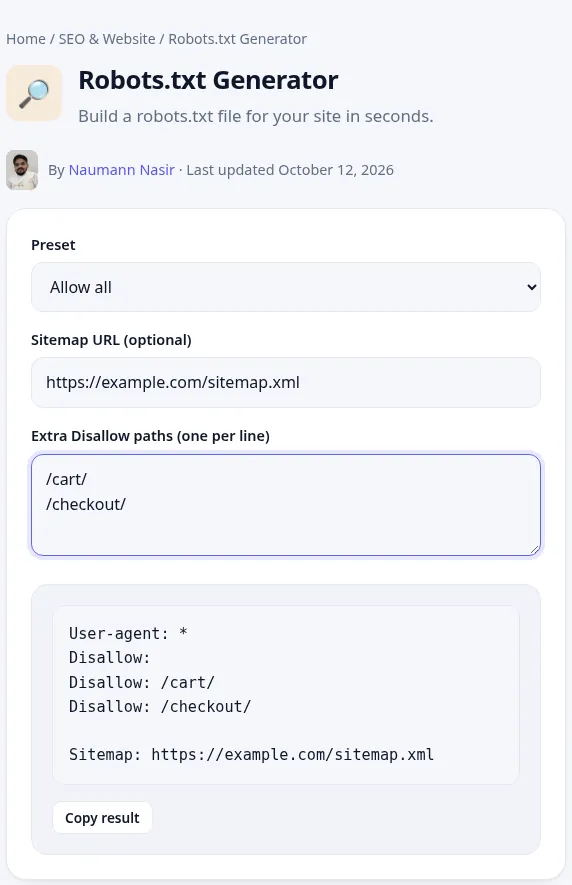
The tool returned:
User-agent: *
Disallow:
Disallow: /cart/
Disallow: /checkout/

Sitemap: https://example.com/sitemap.xml
Delete the empty Disallow: line before you publish. Here is why. I ran that exact output through two parsers. Protego, the parser used by the Scrapy crawling framework, follows the standard's longest-match rule and blocked /cart/ for Googlebot as intended. Python's built-in urllib.robotparser uses the first rule that matches, read the empty Disallow: as "allow everything" and let Googlebot into /cart/. Without the empty line, both parsers agreed. You cannot know which parser a given bot uses, so remove anything ambiguous.
Step 2: add a group for AI training crawlers
Below the generator's output, add one group that lists the AI training crawlers you want to stop. Several User-agent lines can share one rule:
User-agent: *
Disallow: /cart/
Disallow: /checkout/

User-agent: GPTBot
User-agent: ClaudeBot
User-agent: Google-Extended
User-agent: Applebot-Extended
User-agent: CCBot
User-agent: Meta-ExternalAgent
Disallow: /

Sitemap: https://example.com/sitemap.xml
Each name comes from the company's own documentation, checked on October 20, 2026:
| Token | Company | What blocking it does |
|---|---|---|
| GPTBot | OpenAI | Signals your content should not be used to train its foundation models (OpenAI docs) |
| ClaudeBot | Anthropic | Excludes your future pages from its model training data (Anthropic help) |
| Google-Extended | Controls use of your content for Gemini training and grounding; Google says it does not affect Search inclusion or ranking (Google docs) | |
| Applebot-Extended | Apple | Opts out of training Apple's generative foundation models (Apple support) |
| CCBot | Common Crawl | Stops Common Crawl, whose open dataset is widely used for AI training (Common Crawl) |
| Meta-ExternalAgent | Meta | Meta's documentation describes it as crawling for uses such as training foundation AI models, as quoted by Search Engine Journal |
Google-Extended is unusual. It has no user-agent string of its own; Google crawls with its normal crawlers and only reads this token as an instruction. Blocking Googlebot itself would remove you from Google Search, which is almost never what you want.
Step 3: decide about AI search bots separately
Most AI companies now run a second bot for their search or answer features, and the documentation treats it as a separate choice from training:
- OAI-SearchBot (OpenAI): OpenAI says sites that block it will not be shown in ChatGPT search answers.
- Claude-SearchBot (Anthropic): blocking it may reduce your visibility in Claude's search results.
- PerplexityBot: Perplexity says it surfaces and links sites in its search results and is not used to crawl content for foundation models.
- Meta-WebIndexer: Meta says allowing it helps Meta AI cite and link to your content.
The file above blocks none of these, so you keep a chance of being cited and linked. If you want out of AI answers entirely, add them to the blocking group. That trade-off is yours to make. There is no right answer for every site.
Step 4: test before and after you upload
I checked the final file with both parsers. Googlebot, OAI-SearchBot, Claude-SearchBot, Meta-WebIndexer and PerplexityBot could fetch /blog/post but not /cart/. GPTBot, ClaudeBot, CCBot and Meta-ExternalAgent were blocked everywhere. After you upload, open yourdomain.com/robots.txt in a private browser window to confirm the live file is the new one. Some hosts and CMS plugins generate robots.txt dynamically and quietly override the file you uploaded.
It also helps to look at how large publishers handle it. When I opened The New York Times' robots.txt on October 20, 2026, it had separate groups for Applebot-Extended, CCBot, ClaudeBot, Google-Extended, GPTBot, Meta-ExternalAgent and PerplexityBot. The Guardian's listed CCBot, PerplexityBot, ClaudeBot, Applebot-Extended and meta-externalagent. Their choices are not rules for your site, but they show the format working on very large sites.
What robots.txt will not stop
- Bots that ignore it. Common Crawl itself warns that some crawlers falsely identify themselves as CCBot. Stopping those requires firewall or bot-management rules at your host or CDN.
- User-triggered fetches. OpenAI says robots.txt rules "may not apply" to ChatGPT-User, which visits a page when a person asks ChatGPT about it. Meta's documentation, as summarized by SEJ, says Meta-ExternalFetcher may bypass robots.txt when it fetches a page at a user's request.
- Content already collected. Anthropic, for example, describes blocking ClaudeBot as excluding your site's future materials. Nothing in robots.txt reaches back into data gathered earlier.
- Contract terms. Whether Meta's October 30 terms let it crawl beyond what your robots.txt says is a legal question. SEJ notes the terms do not say whether robots.txt limits what a business agrees to. If that matters to your business, read the terms or ask a lawyer.
Common mistakes
- Repeating your
*rules in every group, or forgetting to. A bot with its own group ignores the*group. If GPTBot should also avoid/cart/while still being allowed elsewhere, its group needs that line too. WithDisallow: /it does not matter. - Typos in tokens. Matching is case-insensitive, but a misspelled name like "GPT-Bot" matches nothing.
- Blocking Googlebot to stop Gemini. Use Google-Extended instead.
- Putting the file in a subfolder. It must be at the root, and each subdomain needs its own file.
- Using it as security. Private files need a login or must be kept off the server.
Quick checklist
- Generate the base file with the Robots.txt Generator and remove any empty
Disallow:line. - Add one group for AI training crawlers with
Disallow: /. - Decide separately about AI search bots.
- Upload to the domain root, then load the live file to confirm it changed.
- Recheck the company docs every few months, because new bot names keep appearing.
Related reading: How to Use AI Tools Safely covers the other side of AI and privacy, and How to Write a Meta Description That Improves Click-Through helps with the pages you do want crawled. If you are adding structured data at the same time, the Schema Markup Generator builds the JSON-LD.
More free seo & website tools
AI Meta Title and Description Generator
Write SEO titles and meta descriptions that get clicks.
AI🔎Keyword Density Checker
Find your most-used words and phrases and their density.
🔎URL Slug Generator
Turn a title into a clean, SEO-friendly URL slug.