 USA AI Tools
How to Plan a Trip with an AI Itinerary (and Fact-Check It)
 By Naumann Nasir · Last updated
AI itinerary tools are good at one thing that is hard to do yourself: turning a destination and a rough idea of what you like into a structured day-by-day plan in a few seconds. They are bad at something just as important: knowing what is true today. Restaurants close, opening hours change and AI can confidently invent a place that does not exist.
This guide shows how to get the useful part without the risky part. We ran our free Travel Itinerary Helper for a real destination, then fact-checked the result step by step. The output quoted below is exactly what the tool returned when we ran it on October 12, 2026. If you run it yourself, you will get a different plan, because AI answers vary each time.
Step 1: Give the tool clear inputs
The Travel Itinerary Helper asks for three things: a destination, the number of days (1, 2, 3, 4, 5 or 7) and a travel style (Balanced, Budget, Food-focused, Culture and history, Relaxed or Adventure). We used:
- Destination: Chicago, Illinois
- Days: 3
- Style: Food-focused
Be specific with the destination. "Chicago, Illinois" avoids confusion with other places of the same name, and a neighbourhood or base, such as "staying near the Loop", can help the tool group activities sensibly.
Step 2: Read the draft for structure, not facts
The tool returned a plan with morning, afternoon and evening ideas for each day, three practical tips and a reminder to check details. Here is part of Day 1 as returned:
Morning – Start at Lou Malnati's Pizzeria (deep-dish pizza) near the Loop. Grab a slice and a coffee before heading to the Art Institute of Chicago for a quick museum stroll.
Afternoon – Walk to The Gage for a light lunch of classic American fare. Then take a stroll down Michigan Avenue, popping into the Magnificent Mile shops.
As a skeleton, this is genuinely helpful. It groups the Art Institute, a nearby restaurant and Michigan Avenue into one walkable day, and it gives you a mix of well-known food stops. The ending tips were also sensible, such as booking popular restaurants ahead and using public transport.
The right way to treat the draft is as a list of candidates, not a schedule. Before anything goes into your calendar, check four things: does the place exist, where exactly is it, is it open when you plan to go, and how long does it take to get there from the previous stop.
Step 3: Fact-check every named place
Checking the Chicago plan turned up several problems. None of them is unusual for AI-generated travel plans, which is exactly why this step matters.
Wrong neighbourhoods
Day 3 says: "Begin at Eataly Chicago on the South Side for breakfast pastries and a cappuccino." Eataly's Chicago store is in River North, near the Magnificent Mile, not on the South Side. The plan then says to "take a short walk to the nearby Museum of Science & Industry". The Museum of Science and Industry is in Hyde Park on the South Side, many miles from River North. That "short walk" would actually need a bus, train or car ride, so the afternoon timing does not work as written.
Similarly, Day 2 puts lunch in Wicker Park and then suggests "catch a show at the Music Box Theatre". The Music Box Theatre is in Lakeview, a different neighbourhood, so check the travel time on a map before planning both in one afternoon.
Places we could not confirm
The plan names several smaller places, including "Café Dal", "Gelateria Del", "Sushi Katsu" and "Miller's Baking Co.". From the itinerary alone we could not confirm that these exist at the locations described. AI tools sometimes produce names that sound plausible but are wrong or incomplete. Search for each one on a map app, and if you cannot find it with a current address and recent reviews, drop it.
Details that sound specific but need checking
One of the tips says to "download the 2Go app" for the city's trains and buses. We could not find a Chicago Transit Authority app by that name; the CTA's own website is the place to check which app and fare cards it currently supports. The plan also repeats Portillo's on Day 2 and Day 3, which is fine if you love Italian beef, but you may prefer to swap one visit for somewhere new.
Opening hours
The very first stop is deep-dish pizza in the morning. Many pizza restaurants do not open until late morning or lunchtime, so the order of the day may need to change. Check each place's current hours on its official website or map listing, especially on Mondays and holidays when many restaurants close.
Step 4: Rebuild the plan around neighbourhoods
Once you know where everything really is, regroup the stops by area so you are not crossing the city repeatedly. For the Chicago draft, a sensible regrouping would be:
- Loop and Michigan Avenue day: the Art Institute, The Gage, Lou Malnati's or Giordano's, a Magnificent Mile walk and Eataly in River North.
- West Loop and Wicker Park day: Girl & the Goat in the West Loop and The Violet Hour in Wicker Park, both of which the plan placed in the right neighbourhoods, plus anything else you confirm nearby.
- South Side day: the Museum of Science and Industry in Hyde Park, with food stops you find in that area rather than across town.
The AI did the brainstorming; the regrouping and checking is your part, and it usually takes 20 to 30 minutes with a map.
Step 5: Sort out times and dates
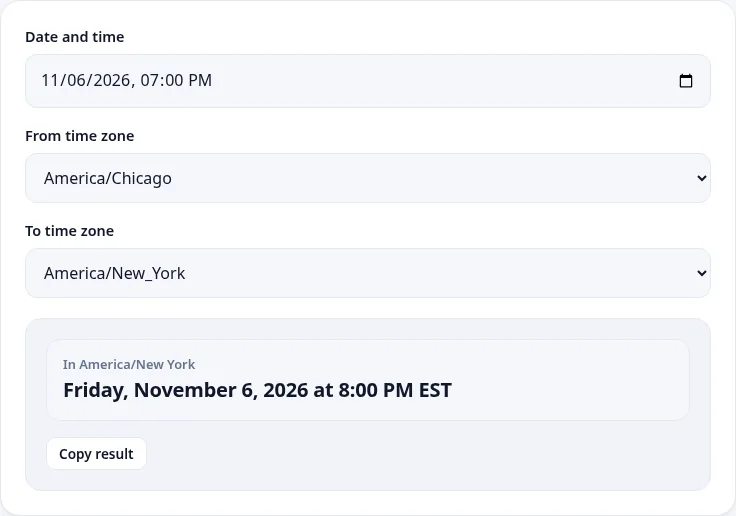
Two small calculators help with the practical side. If you are travelling from another time zone, the Time Zone Converter stops you from booking calls or dinners at the wrong time. For example, a 7:00 pm dinner reservation in Chicago on Friday, November 6, 2026 is 8:00 pm in New York.
The Date Difference Calculator tells you how much planning time you have. From October 12 to November 6, 2026 is 25 days, or 19 weekdays, which is enough to book popular restaurants that take reservations a few weeks ahead.
Tips for better AI itineraries
- Pick the style that matches your trip. "Food-focused" produced mostly restaurants; "Culture and history" will lean towards museums and landmarks; "Relaxed" leaves more space.
- Ask for fewer days at a time. A 1 or 2-day plan for each part of a longer trip is easier to check than a 7-day plan.
- Run it twice. A second run gives different ideas. Keep the places that appear in both and that you can verify.
- Treat named businesses as suggestions. Well-known landmarks are usually right; small cafés and shops are where errors are most likely.
- Check travel advisories and entry rules for international trips on official government websites. An itinerary tool does not cover those.
Other AI tools that help with trips
If you are travelling with dietary needs, the Meal Planner can help plan the days you cook, and the Recipe from Ingredients tool is useful in a rental kitchen. If you are sharing the trip online, the TikTok Idea Generator suggests short-video ideas with hooks, which you can adapt into a travel diary. The same rule applies to all of them: AI drafts, you check.
The bottom line
Our test plan for Chicago was a useful first draft. It picked well-known food stops, grouped one day sensibly and gave practical tips. It also put a major store in the wrong part of the city, described a long trip as a short walk, named places we could not confirm and mentioned an app we could not find. That combination is typical. Use the Travel Itinerary Helper to get ideas and structure in seconds, then spend a little time with a map and official websites before you book anything.
More free fun & everyday ai tools
AI Story Idea Generator
Get original story plots, characters and twists.
AI🎲AI Gift Idea Finder
Find thoughtful gift ideas by budget and personality.
AI🎲AI Recipe from Ingredients
Tell us what is in your kitchen and get recipe ideas.
AI