 USA AI Tools
How to Protect Your AI API Keys (and What to Do If One Leaks)
 By Naumann Nasir · Last updated
Over the weekend of October 17, 2026, the AI coding tool OpenCode told some users of its hosted Console service to revoke the OpenAI, Anthropic and Google keys they had saved there. According to The Hacker News, an intruder reached a legacy OpenCode system on the night of October 16, and the affected group was 1.4% of Console users who had linked an outside provider. TechCrunch and BleepingComputer reported users posting about unauthorized charges, some in the hundreds of dollars. Those amounts come from users' own posts and were not confirmed by OpenCode, which said refunds were underway.
The OpenCode command-line and desktop apps were not part of it; those keep keys on your own machine. Still, the incident is a clear reminder of something easy to forget: an AI API key is a password that spends money. This guide covers how to keep one safe, using the providers' own advice, and what to do in the first hour if one leaks.
Why a leaked key costs money so fast
An API key is a bearer credential. Whoever holds a copy can send billable requests on your account until the key is revoked, with no password or second factor in the way. The Hacker News also pointed out two details that catch people out: deleting a key from a third-party tool does not revoke it at the provider, and a budget set inside that tool cannot cap requests that bypass it. Only the provider can stop the key.
Five habits that limit the damage
1. One key per tool, per project
OpenAI's API key safety guide recommends a unique key for each team member, and Anthropic's key best practices recommend separate keys for different purposes, such as development and production. If your coding agent, your website and your automation each have their own key, a leak from one means revoking one key, and the usage logs show which tool it came from.
2. Hard spend limits, not just alerts
OpenAI says to set monthly spend limits for the organization or project and turn on hard enforcement, and notes that "spend alerts alone don't stop API traffic." It also warns that enforcement is not instantaneous, so spend can slightly exceed the limit. Anthropic suggests spend limits on its Billing page, or, on standard plans, careful auto-reload limits, because auto-reload can keep paying for a leaked key's usage. Set the cap at a figure you could absorb if it were all wasted.
3. Keys stay on a server, never in a browser or app
OpenAI is explicit: never deploy a key in client-side code such as a browser or mobile app, because anyone can pull it out and make requests on your behalf. Route requests through your own backend instead. This site's AI tools work that way: the browser sends the form fields to our server, the server builds the prompt and calls the provider, and the key never reaches the visitor's browser.
4. Environment variables or a secrets manager, never the code
Both providers say not to commit keys to a repository, private ones included, and to load them from environment variables. Anthropic adds that if you use a local .env file, it must be listed in .gitignore, and that in cloud environments an encrypted secret store is better than a dotenv file.
5. Expiry dates and regular rotation
OpenAI project keys can be created with an expiration date, and OpenAI recommends a rotation routine: create the replacement, update your apps, confirm it works, then revoke the old key. Anthropic gives "every 90 days" as an example schedule. Rotation feels like a chore until the day a key leaks and you already know exactly where it is used.
Protect the account behind the keys
Anyone who can log in to your provider dashboard can create new keys, so the account password matters as much as the keys. Make it long, random and used nowhere else, and turn on two-factor authentication.
I generated three candidates in the free Password Generator at length 32 with all four character sets switched on. The tool rated them Very strong at 197 bits of entropy. That figure is simply 32 characters times log2 of the 72-character set the tool draws from.
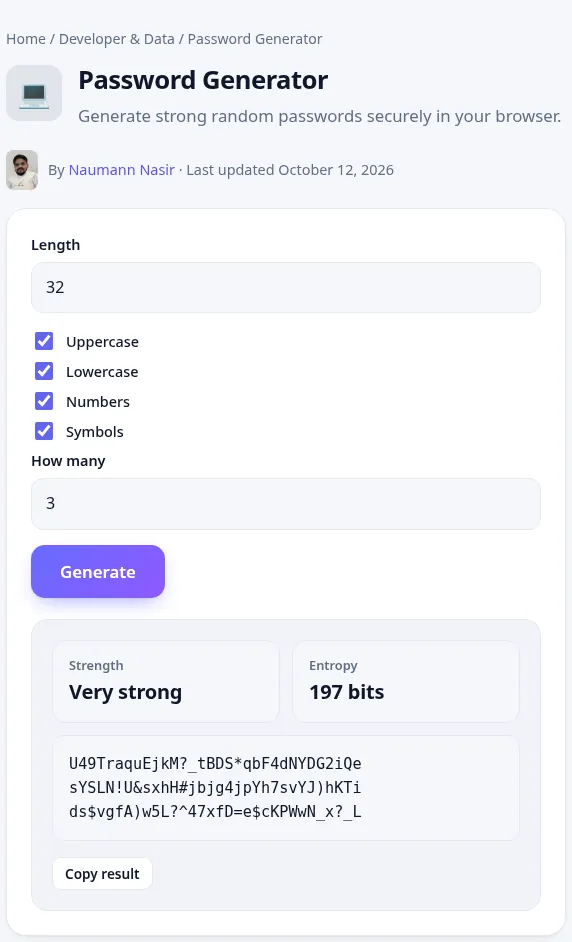
Two honest caveats. First, the generator makes account passwords; it does not create API keys, which only the provider can issue. Second, the entropy number assumes the password is random and never reused. A 32-character password saved in a public note is still exposed. Put it straight into a password manager. For more on length, passphrases and two-factor options, see How to Create a Strong Password in 2026.
If a key leaks: the first hour
- Revoke the key at the provider. Do it in the OpenAI, Anthropic or Google dashboard itself. Removing it from the tool that leaked it is not enough.
- Create a replacement and update everything that used the old one. This is where one-key-per-tool pays off; you only have one place to update.
- Review usage and logs. Look for requests you did not make, going back to before the incident started. OpenAI points to its Usage page; Anthropic to its Logs and Usage pages. Note models, times and amounts.
- Lower or set a hard spend limit while you investigate.
- Contact the provider's support if you see charges you did not make. In the OpenCode case, TechCrunch reported that Anthropic and Google blocked keys they believed were exposed and OpenAI said it refunded affected credits, but do not assume that happens automatically.
- Change the account password if there is any chance the dashboard login was exposed too.
Before you paste a key into any third-party tool
Anthropic's guidance puts it plainly: when you upload your key to a third-party tool, you are giving that tool's developer access to your Claude Console account. Only do it with tools you trust. A few questions worth asking first:
- Does the tool store the key on its servers, or only on your machine?
- Can you give it a dedicated key with its own spend limit?
- Would you notice within a day if that key started being used at 3 a.m.?
None of this needs special software, and most of it is a one-time setup per provider. Done in advance, it turns a leak into a revoked key and a short log review instead of a billing dispute.
Limitations
- Dashboard names and options differ by provider and change often. Check each provider's current documentation.
- Details of the OpenCode incident were still developing when this was written, and OpenCode had not said how the legacy system was reached.
- This is general security guidance for individuals and small teams, not a full incident-response plan.
Related: How to Use AI Tools Safely covers what not to paste into AI tools, and the UUID Generator is handy when you need random, non-secret identifiers for test data.
More free developer & data tools
JSON Formatter and Validator
Format, minify and validate JSON.
💻Base64 Encoder and Decoder
Encode or decode text to and from Base64.
💻UUID Generator
Generate random v4 UUIDs in bulk.