 USA AI Tools
How to Compare Two Job Offers: Salary, Benefits and Real Hourly Pay
 By Naumann Nasir · Last updated
Two job offers on the table is a good problem to have, but it is still a problem. One offer usually looks better on the headline salary, and the other quietly wins on something else: benefits, time off, hours or flexibility. If you only compare the salary line, you can end up taking the job that pays less once everything is counted.
This guide walks through a complete comparison of two realistic offers using three free tools on this site: the Job Offer Comparison calculator, the Salary Converter and the Work Hours Calculator. Every number below was produced by those tools with the inputs shown, so you can repeat the steps with your own figures.
The two offers in our example
Imagine you have been offered two operations roles. The details are invented for this example, but they are typical of what offer letters contain:
- Offer A: $72,000 base salary, a $2,500 yearly bonus, benefits the employer values at $5,400 a year, 12 days of paid time off (PTO). Office hours are 8:30 am to 6:00 pm with a 30-minute unpaid lunch.
- Offer B: $68,000 base salary, no bonus, benefits worth $9,600 a year (a richer health plan and a higher retirement match), 20 days of PTO. Hours are 9:00 am to 5:30 pm with a 30-minute unpaid lunch.
On salary alone, Offer A is $4,000 ahead. Let's see how much of that survives.
Step 1: Put a dollar value on benefits
The benefits figure is the one people most often skip, because it is not printed in big numbers on the offer letter. It matters, though. Employer contributions to health insurance and retirement are real money that you would otherwise pay yourself.
To estimate it, ask each employer's HR team for:
- the employer's share of your health, dental and vision premiums for the coverage you would choose,
- the retirement match (for example, 50% of your contributions up to 6% of salary) and what that works out to if you contribute enough to get the full match,
- any fixed allowances, such as a phone, home office or wellness stipend.
Add those up for a year. In our example that gives $5,400 for Offer A and $9,600 for Offer B. If an employer will not share the numbers, use the plan documents to make a cautious estimate, and write down that it is an estimate.
Step 2: Compare total yearly value
Open the Job Offer Comparison tool and enter the salary, bonus, benefits value and PTO days for each offer. The tool adds salary, bonus and benefits for each offer and shows the difference.
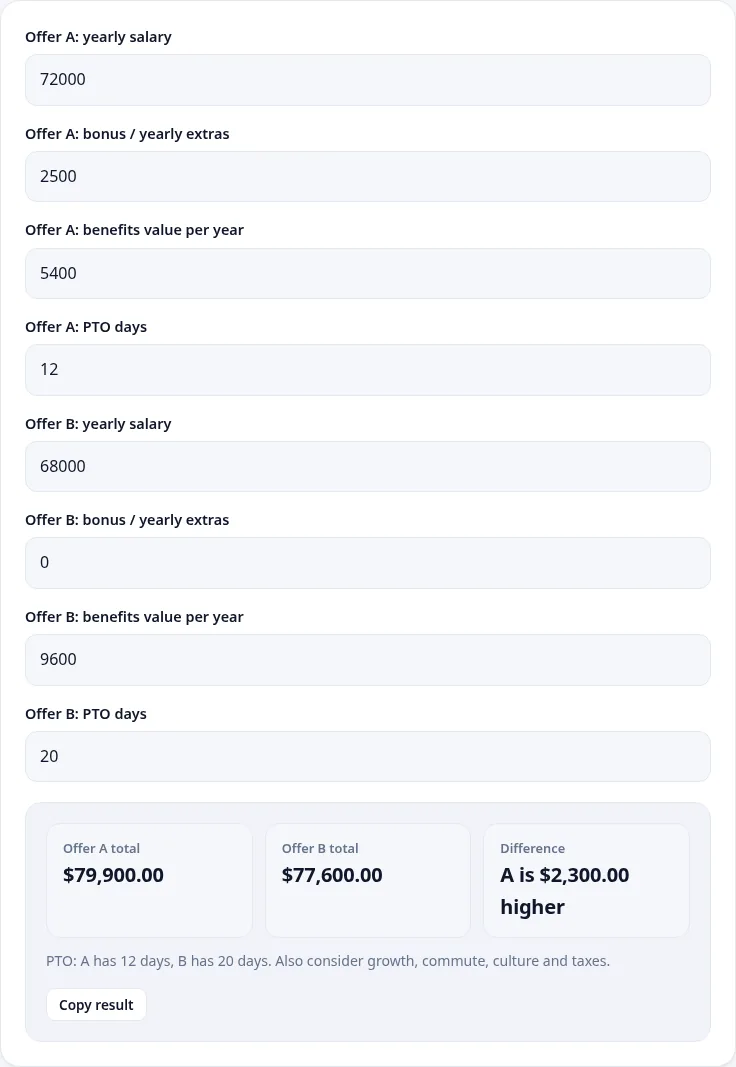
The result:
- Offer A total: $79,900.00
- Offer B total: $77,600.00
- Difference: A is $2,300.00 higher
- PTO: A has 12 days, B has 20 days.
Once the bonus and benefits are counted, Offer A's $4,000 salary lead shrinks to $2,300: its $2,500 bonus adds to the lead, but Offer B's benefits are worth $4,200 more. That is still a lead, but it is no longer the whole story, because Offer A also asks for more of your time.
Step 3: Check the real working hours
Offer letters often state a salary without spelling out the hours. Here, Offer A's office runs 8:30 to 6:00 and Offer B's runs 9:00 to 5:30. Both have a 30-minute unpaid lunch. The Work Hours Calculator turns those times into weekly hours:
- Offer A: 8:30 to 18:00 minus 30 minutes, 5 days a week = 9.00 hours a day, 45.00 hours a week.
- Offer B: 9:00 to 17:30 minus 30 minutes, 5 days a week = 8.00 hours a day, 40.00 hours a week.
Five extra hours a week is about 260 extra hours a year before holidays, which is the equivalent of six or seven additional 40-hour weeks.
Step 4: Work out your effective hourly pay
To compare offers with different hours fairly, convert each total into an hourly figure. The Salary Converter lets you set both the hours per week and the weeks you actually work per year, so you can account for time off as well.
First, the simple version with 52 working weeks:
- Offer A: $79,900 a year at 45 hours a week = $34.15 an hour.
- Offer B: $77,600 a year at 40 hours a week = $37.31 an hour.
Now account for paid time off. Twelve PTO days is 2.4 working weeks, so you would work about 49.6 weeks a year at Offer A. Twenty PTO days is 4 weeks, so about 48 weeks at Offer B. Entering those figures:
- Offer A: $79,900, 45 hours, 49.6 weeks = $35.80 an hour.
- Offer B: $77,600, 40 hours, 48 weeks = $40.42 an hour.
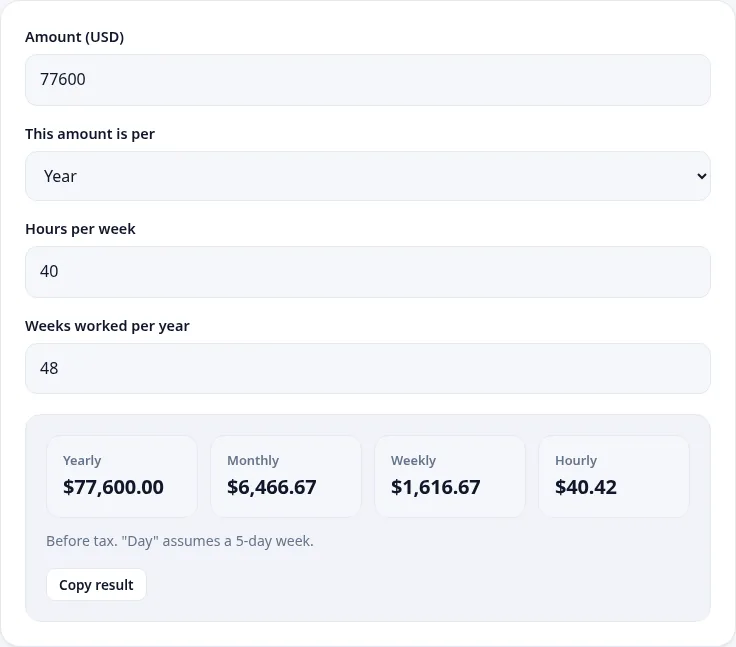
This is the most useful number in the whole comparison. Offer A pays $2,300 more per year in total, but for every hour you actually work, Offer B pays about $4.62 more. Whether that matters depends on how you value your time, but it should be a conscious choice rather than a surprise three months into the job.
Step 5: Add the costs the offer letter does not mention
Some costs come straight out of your pocket and change the comparison:
- Commuting. If Offer A is fully in the office and Offer B is hybrid, add up fuel, parking or transit passes for each. For example, if Offer A's commute costs $150 a month more than Offer B's, that is $1,800 a year, and Offer A's $2,300 lead drops to $500.
- Equipment and home office. A remote role might need a better internet plan or a desk. Some employers pay a stipend, which belongs in the benefits figure.
- Childcare or care costs. Longer office hours can mean extra hours of paid care.
The Job Offer Comparison tool does not include these automatically, so subtract them from the relevant offer's total yourself, or reduce that offer's benefits value by the yearly cost and run it again.
Step 6: Weigh what calculators cannot measure
Once the money is clear, the deciding factors are often non-financial. The tool itself reminds you to "also consider growth, commute, culture and taxes", and those are worth taking seriously:
- Growth: Which role teaches you skills that will be worth more in two years? Is there a clear path to promotion, and how have people in the role progressed?
- Stability: How long has the team existed? Is the bonus guaranteed, or does it depend on company results? A non-guaranteed bonus is worth less than a salary increase of the same size.
- Manager and team: If you met your future manager during interviews, how did the conversations feel? Many people leave jobs because of managers rather than pay.
- Taxes: If the jobs are in different states or cities, take-home pay can differ even with the same gross salary. The figures in this guide are all before tax.
Common mistakes when comparing offers
- Comparing base salary only. In the example, counting the bonus and benefits cut Offer A's lead from $4,000 to $2,300.
- Treating a target bonus as guaranteed. If the bonus is "up to" an amount, use a conservative figure, or run the comparison twice: once with the full bonus and once with none.
- Ignoring hours. A higher salary for longer hours can be a lower hourly rate. Convert both offers to hourly pay before deciding.
- Forgetting one-off payments. A signing bonus is nice, but it only arrives once. For a long-term comparison, divide it by the number of years you expect to stay, or leave it out.
- Not asking. Benefits values, remote work rules and bonus history are all fair questions before you accept. Employers expect them.
Using the comparison to negotiate
A clear comparison is also useful in a negotiation. If you prefer Offer A's work but Offer B's hourly value, you can ask Offer A for something that closes the gap: an extra week of PTO, a higher base salary or a hybrid schedule that cuts commuting costs. Showing that you have looked at total compensation, not just the headline number, tends to lead to more productive conversations. Keep the tone positive and specific, and only mention the other offer's details if you are comfortable doing so.
If you need help with the written side, the Thank You Note Writer can draft a short, polite reply to either employer, and the Email Writer can help you phrase a counter-offer request.
Quick checklist
- Get the employer's yearly benefits value for each offer in writing, or estimate it from plan documents.
- Enter salary, bonus, benefits and PTO for both offers in the Job Offer Comparison tool.
- Calculate real weekly hours with the Work Hours Calculator.
- Convert each total into hourly pay with the Salary Converter, using hours per week and weeks worked after PTO.
- Subtract commuting and other job-related costs.
- Write down the non-money factors and decide which matter most to you.
None of these tools can tell you which job to take. What they can do is make sure the decision is based on the full picture, with every number visible and checked. The figures here are estimates before tax and are not financial advice, so if your situation is complex, for example with stock options or a move between states, it is worth talking to an accountant.
More free job & resume tools
AI Resume Bullet Improver
Turn weak resume lines into strong, results-focused bullets.
AI💼AI LinkedIn Headline Generator
Get 8 headline options that attract recruiters.
AI💼AI Interview Question Generator
Practice with likely interview questions and answer tips.
AI